Your Workspace, Your Control: How AI Analyst Keeps You in Control

AI Analyst was built for some of the most sensitive work inside an organization. But security is not only about how a product handles information. It is also about giving organizations control over how the product can be used in the first place.
Different boards and organizations have different requirements. One may want directors to use AI Analyst freely across BoardRadar and their own materials. Another may want every conversation grounded in a document. Another may want to limit how users interact with AI altogether. Some may permit directors to maintain private document libraries; others may require those documents to disappear after every session.
There should not be one security policy imposed on all of them.
That is why AI Analyst gives organization administrators control over the workspace itself, the ways members can interact with it, and how private documents are handled.
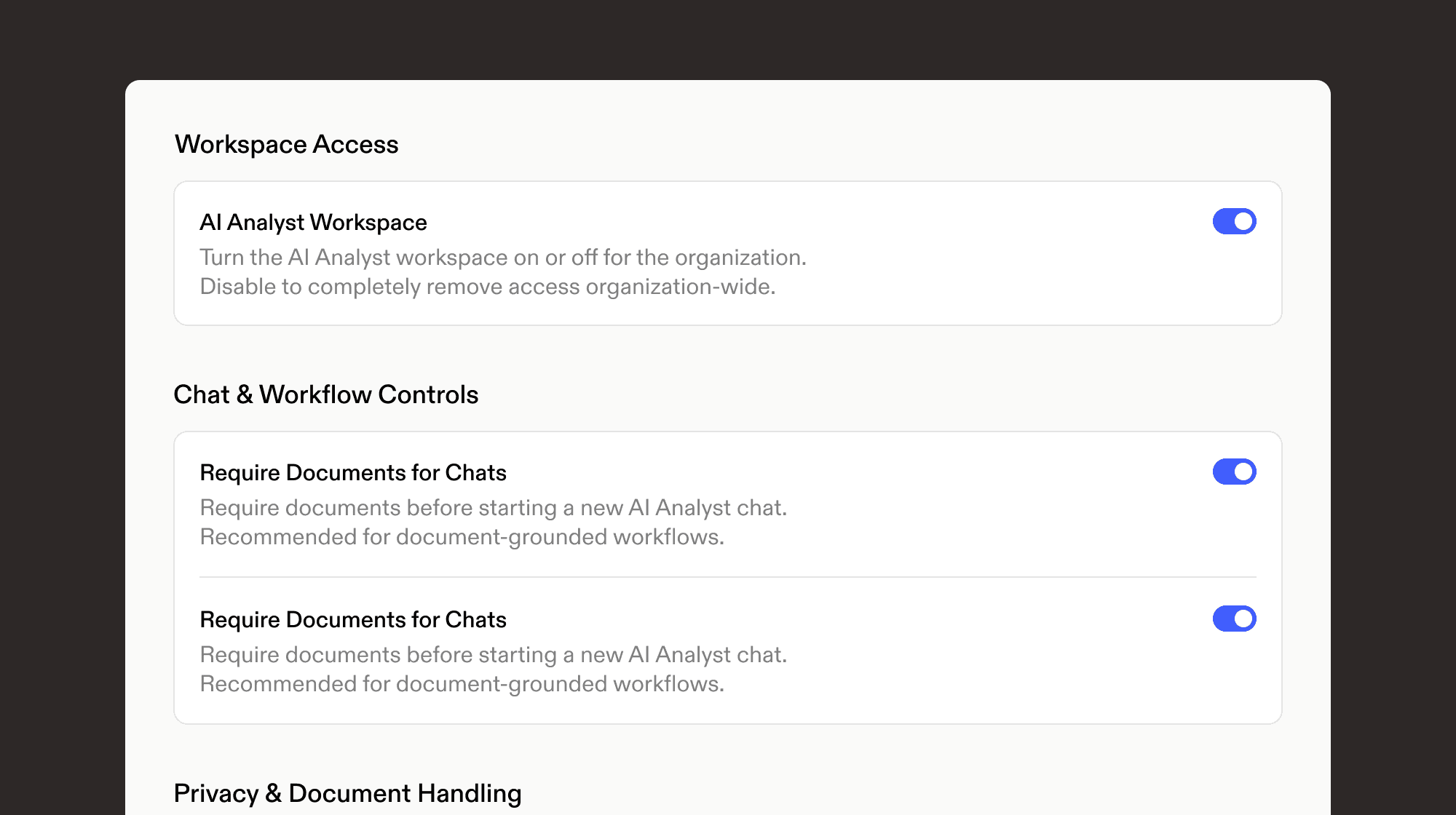
Organization administrators can configure AI Analyst access, workflows and document handling from one set of workspace controls.
Start with access itself
The most fundamental control is also the simplest: an administrator can turn AI Analyst on or off for the entire organization.
If an organization is not ready to make AI available to its members, it does not have to. Disabling the workspace removes access organization-wide. When the organization is ready, an administrator can enable it centrally.
This matters because adopting AI at the board level should be a deliberate organizational decision, not something individual users quietly determine for themselves. AI Analyst gives the organization a clear boundary around whether the capability is available at all.
But once it is enabled, administrators can go considerably further.
Decide how AI Analyst can be used
By default, AI Analyst is designed to be flexible. A director can ask a question, investigate an issue, work with BoardRadar's intelligence, or provide additional context for the analysis.
Some organizations will want more structure.
Administrators can require documents for AI Analyst chats, creating a document-grounded workflow rather than allowing members to begin unrestricted conversations. For organizations that want AI use centered on intentionally supplied materials, this establishes that expectation at the product level instead of relying on a policy that users have to remember.
Administrators can also restrict chats to BoardRadar's suggested prompts. These prompts are designed around the questions and workflows AI Analyst was built to support, giving users a comprehensive set of ways to investigate the company while limiting completely open-ended input.
This creates a useful spectrum. An organization can give members broad freedom to work with AI Analyst, establish a more structured document-based workflow, or constrain interaction to predefined prompts.
The important point is that the organization decides.
Control what users can bring into the workspace
Documents make AI considerably more useful.
A director may want to interrogate a board book, examine a management presentation, analyze a financial document or bring other internal information into a conversation. AI Analyst allows that information to be considered alongside BoardRadar's own intelligence, giving the model both the internal context supplied by the user and the outside-in view BoardRadar continuously maintains.
But allowing document uploads raises another question: who else gets to see them?
AI Analyst supports private document uploads specifically for this reason. When enabled by the organization, a member can upload a document that remains private to that user. Other members of the organization cannot browse it, open it or use it simply because they share the same BoardRadar workspace.
That makes private documents genuinely personal to the user rather than automatically turning every upload into an organizational resource.
By default, private documents don't stay
The next control is deliberately opinionated.
By default, Retain Private Documents After Chats is turned off.
A user can upload a document, use it during an AI Analyst session and receive the benefit of that context without the file automatically becoming a permanent part of their library. When the session ends, the private document is automatically deleted.
This follows the same principle that underpins AI Analyst more broadly: sensitive information should not be retained simply because retaining information is convenient for software.
AI Analyst is designed around an unusually strict approach to session data. Prompts, conversation content and outputs do not become a permanent conversational history, and by default the private files brought into that session do not remain afterward either.
For many organizations, that is exactly the behavior they will want.
But there is a legitimate reason to make a different choice.
When convenience is the right choice, make it explicit
Some directors work with the same materials repeatedly. Re-uploading a document every time they return to AI Analyst may be unnecessary friction.
An organization can therefore allow private documents to remain available after a session. When this setting is enabled, users can maintain files in their private library and return to them later rather than uploading them again each time.
The distinction is important: persistence is a choice, not the default.
A retained private document remains private to the user. It does not become part of another member's library simply because both users belong to the same organization. And organizations that do not want persistent private files can leave the control off, as it is by default.
This is how we think sensitive-product defaults should work. Start with the more restrictive behavior. Allow additional convenience when an organization deliberately chooses it.
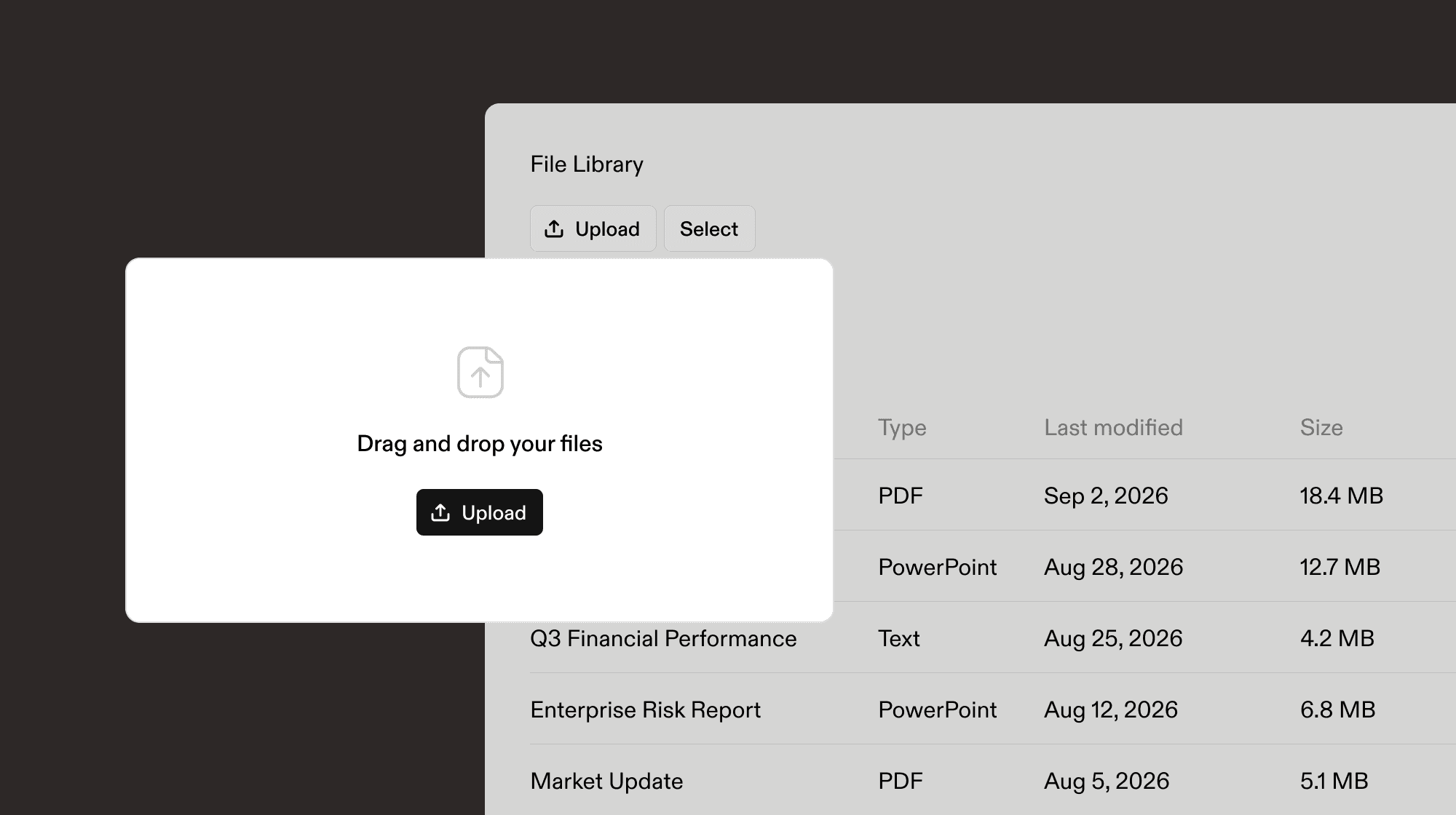
Users can bring private documents into AI Analyst for a single session or, when permitted by their organization, keep them in a private library for future use.
Controls should exist in the product, not just in the policy
There is an important difference between telling users how they are permitted to use AI and actually designing those rules into the product.
A policy might say that employees should only use AI with certain materials. It might tell them not to retain sensitive documents. It might specify approved use cases. Those policies are important, but they still depend on every individual remembering and correctly applying them every time they use the system.
AI Analyst allows organizations to turn many of those decisions into product controls.
Don't want AI Analyst available? Disable it. Want conversations centered on documents? Require them. Want to constrain open-ended usage? Restrict users to suggested prompts. Want users to work with their own private documents? Allow it. Don't want those documents persisting after the session? Keep retention disabled.
The result is not simply more settings. It is a way for an organization to make its chosen approach to AI part of the environment in which AI is actually used.
Security and control are different things
AI Analyst's underlying security model does not change because an administrator adjusts these settings. Customer content is not used for AI model training. Completed conversations do not become a permanent content history. BoardRadar staff cannot browse through users' prompts and responses.
Workspace controls solve a different problem. They determine what an organization permits its people to do within that secure environment.
That distinction is particularly important at board level. One organization may have a very different risk posture, governance structure or workflow from another. A product designed for sensitive work should not force both organizations into exactly the same operating model.
It should establish strong security underneath and give each organization meaningful control above it.
Your workspace should work by your rules
The promise of AI in the boardroom is not simply that directors can ask an LLM questions. AI Analyst can combine that reasoning capability with BoardRadar's intelligence across financial performance, competitors, talent, governance and risk, reputation, AI activity, markets and other signals, as well as the internal information a director chooses to bring into the analysis.
That is a powerful environment. Organizations should have meaningful control over how it is used.
For us, that means control begins before the first prompt is ever entered. It determines whether AI Analyst is available, how members can interact with it, what information they can bring into it and whether their private documents remain afterward.
The workspace belongs to the organization. The controls should too.